Ever found yourself struggling to calculate the exact duration of your work shift, especially when it crosses over midnight? Or maybe you need to figure out the precise number of hours you’ve spent on a project. Manually calculating the time between a start and end time can be surprisingly tricky, with minutes to convert and potential for errors.
This is where an hours calculator becomes an invaluable tool. Whether you’re a freelancer tracking billable hours, an employee filling out a timesheet, or simply planning your day, our intuitive time calculator simplifies the process. Say goodbye to manual calculations and let our tool do the heavy lifting for you!
How to Use Our Hours Calculator
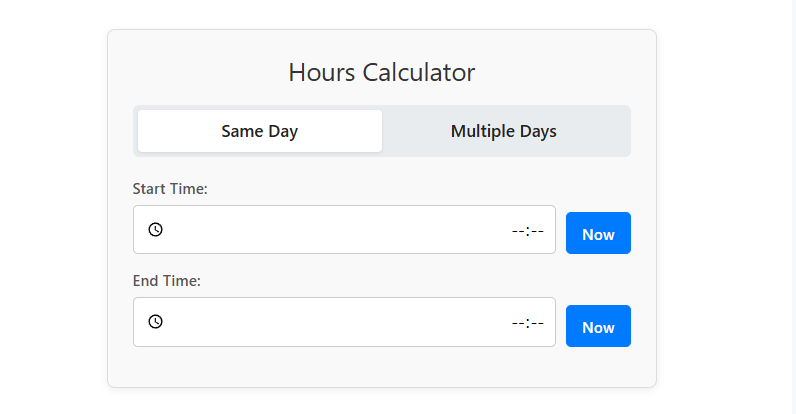
Our calculator is designed for simplicity and speed. Here’s how you can find the time difference in just a few clicks:
- Choose Your Mode:
- Same Day: This is the default setting and is perfect for calculating the duration of a single shift or event, even if it goes past midnight.
- Multiple Days: Switch to this mode if you need to calculate the time span across different dates.
- Enter Your Times:
- Start Time: Input the time when your activity began. You can also click the “Now” button to automatically fill in the current time.
- End Time: Enter the time when the activity concluded.
As you type, the calculator will instantly display the results in multiple formats, so you can choose the one that best suits your needs.
Features of Our Time Calculator
Our hours calculator is packed with features to make your life easier:
| Feature | Description |
|---|---|
| Dual Modes | Seamlessly switch between “Same Day” and “Multiple Days” for accurate calculations in any scenario. |
| Instant Results | The time difference is calculated automatically as you enter the start and end times. |
| “Now” Button | Instantly populate the current time with a single click, saving you time and effort. |
| Multiple Output Formats | Get the results in hours and minutes, total minutes, and decimal hours, which is especially useful for payroll and timesheets. |
Why Use an Hours Calculator?
The applications of an hours calculator are vast and varied. Here are just a few scenarios where this tool can be a lifesaver:
- Work and Payroll: For employees and employers alike, accurately calculating work hours is crucial. Our tool helps ensure that timesheets are precise, which is essential for fair compensation. The decimal hours output is particularly useful for payroll systems.
- Project Management: Freelancers and project managers can use this tool to track the time spent on various tasks and projects. This helps with billing clients accurately and managing project timelines effectively.
- Personal Time Management: Planning an event or want to know how much time you have before your next appointment? The hours calculator can help you manage your personal schedule with greater precision.
Frequently Asked Questions (FAQ)
Here are some common questions about calculating time:
Is noon AM or PM?
By convention, 12:00 PM is noon, and 12:00 AM is midnight.
What if the time-span crosses midnight?
Our calculator handles this automatically! In “Same Day” mode, if the end time is earlier than the start time, the tool assumes the time period crosses midnight. For longer durations, simply switch to “Multiple Days” mode.
How do I calculate hours for a timesheet?
Simply enter your start and end times for each workday. The “decimal hours” output is the format most commonly used for timesheets and payroll software.
Conclusion
Calculating the time between two points doesn’t have to be a complicated task. With our user-friendly hours calculator, you can get accurate results in an instant. Whether you’re tracking your work hours, managing a project, or planning your day, this tool is designed to provide you with the information you need, when you need it.
Try our free hours calculator today and take the guesswork out of time calculation!